![POWWR_PrimaryLogo_RGB.png]](https://www.powwr.com/hs-fs/hubfs/01-MediaKit/Logos/POWWR_PrimaryLogo_RGB.png?height=40&name=POWWR_PrimaryLogo_RGB.png)
1. Can a company be deleted from B360?
No. Companies cannot be deleted once created.
2. Can a site be deleted from B360?
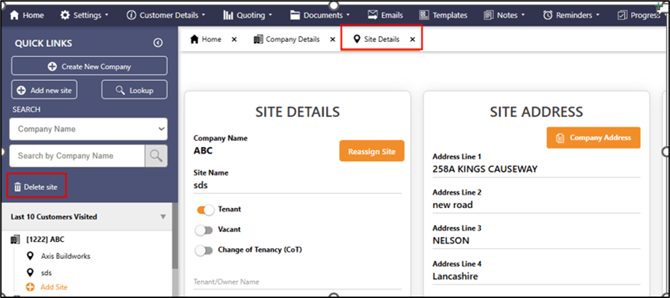
Yes. Open the site in B360 and select Delete Site as shown in the screenshot below:
3. Can quotes be generated without setting up a company and site?
No. You must create a company and a site before generating quotes.
4. Do I get charged for meter look ups when they are completed within my PCW?
Yes. Meter look ups are chargeable whether you use is or your customers use it through your PCW.
LOA, Contracts, Signatures & Document Handling
1. Can an LOA be sent manually to a broker?
LOA's should be sent through the system. If you have your own CRM, we can provide an electronic version. You can raise a support ticket to request it using the link below:
2. Is a Level 2 LOA accepted by POWWR and the suppliers?
We don't accept Level 2 LOA's and neither do the vast majority of suppliers. All contracts need to be signed by the customer, so only Level 1 authorisation is required.
3. How do I upload a customer-signed DocuSign contract?
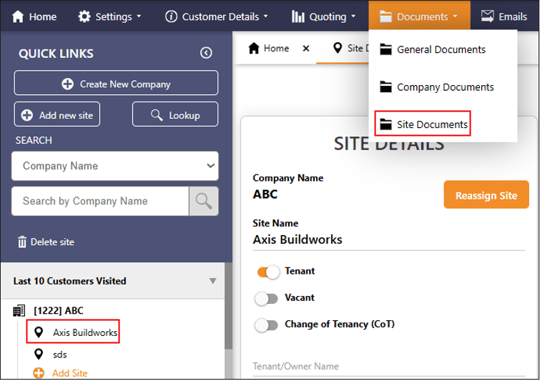
DocuSign contract is automatically added to the site documents section once signed and returned by the customer. However, if you need to manually upload it, you can do it in the site documents section. Here is a screenshot:
4. Can two signatures be captured through B360 for partnerships?
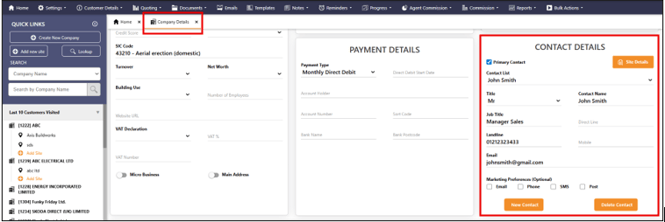
No. One partner must be designated as the signatory. You must update this in the contact details section and mark it as primary contact. Here is a screenshot:
5. Can termination notices be sent through B360?
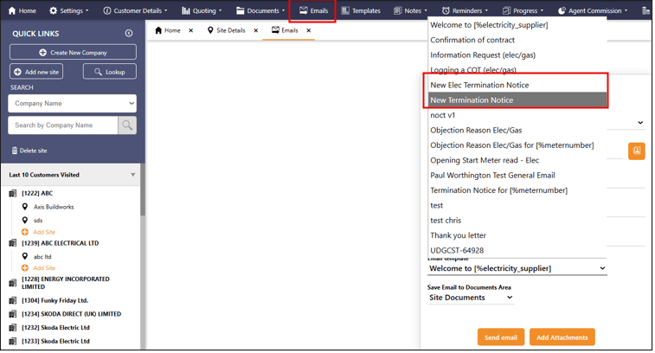
Even though termination notices are no longer required for switching suppliers, you can still send one out if needed. Select the site and then from Email section send the termination notice:
6. What if quotes return a supplier without a POWWR portal and I want to select that deal?
In such a case, follow these steps:
Download the PDF contract and send it to your customer
Once signed by the customer, contact the supplier directly to submit the contract
Upload the contract into the Site Documents section for record keeping
Usage, Metering, KVA & Technical Data
1. Should monthly or annual usage be entered in the system?
Only annual usage is required for comparative quotes to be generated. If you have only monthly usage then just multiply it by 12 and add to the system.
2. When does the system prompt for KVA?
For HH meters with measurement class C or E.
3. How to set up CRM when one site has multiple meters with the same MPAN?
You should create one company and then create separate sites—one per related meter.
Quotes, Templates and Excel Output
1. Does my company logo show on excel file if I have to share the quotes with my customer?
No, your company logo does not show on excel exports.
2. How do I get a specific template created or modified?
Raise a support ticket with the detailed requirements.
3. Can I set a default uplift for all suppliers?
Yes. You are able to se default maximum/minimum uplifts to all supplier products as well as individual uplifts for specific products. Follow this short video to easily setup your supplier product preferences.
How to Manage Supplier Product Settings
4. Does POWWR receive any share of the commission displayed on the quotes page?
No.
5. Are the commission amounts on the quotes page annual or for the full term of the contracts listed?
Commission amounts are listed per year. So, for a 2-year contract, the annual value is multiplied by two and paid out based on the supplier’s specific payment schedule.
6. If a customer fails a credit check, what should I do?
You should move onto a different deal with another supplier.
Supplier Portals and Contract Submissions
1. What date should I enter for the smart meter booking?
This is the smart meter booking date that must be added to the “Electricity Supply” section in Edit Site on the supplier portal. At present, this is only required on the Yu Energy portal.
The date is needed for smart meter migration under the MHHS programme.
Suppliers are moving to MHHS in phases. More information can be found here: MHHS
Supplier Offerings and Payment Terms
Here are the price plans offered by the suppliers followed by their payment terms:
Price plans:
| Price Plans | |||
| Supplier Name | Variable | Fixed | Green |
| BGB | No | Yes | Yes-Natural rego |
| BGL | No | Yes | No |
| Corona | Yes-Shift Fixed | Yes-Fixed | Yes-Green |
| Drax | Yes-Fix Balance | Yes- Fix for good | No |
| Dyce | Yes-Variable | Yes-Advanced | Yes-Renewal |
| E.On Next | No | Yes | Elec only- Rego |
| EDF | No | Yes | No |
| Engie | No | Yes | Elec only |
| SEFE | No | Yes | No |
| SSE | Yes-Choice | Yes-Protect | Yes-Green |
| Scottish Power | Yes | No | Elec only-Renewable |
| Smartest | Yes-Smart Tracker | Yes | Some Elec only |
| Total | No | Yes-Fixed | Elec only- Eco Energy |
| Utilita | No | Yes | No |
| Valda | No | Yes-Smart Choice | No |
| YGP | No | Yes | Elec only-Renewable |
| YU | No | Yes | Elec only |
Payment Terms:
| Payment Terms | ||
| Supplier Name | Electricity | Gas |
| BGB | Term, 80% | Term, 80% |
| BGL | Term, 80% | Term, 80% |
| Corona | Annual, 80% | Monthly |
| Drax | Term, 80% | Term, 80% |
| Dyce | ||
| E.On Next | Term, 70% | Term, 70% |
| EDF | Term, 70% | Term, 70% |
| Engie | Term, 80% | Term, 80% |
| SEFE | Monthly | Term, 80% |
| SSE | Annual, 80% | Annual, 80% |
| Spower | Term, 80% | Term, 80% |
| Smartest | Term, 80% | Term, 80% |
| Total | ||
| Utilita | ||
| Valda | ||
| YGP | Annual | Annual |
| YU | Term, 80% | Term, 80% |
You can download the information using this link: Supplier Price Plans and Payment Terms