![POWWR_PrimaryLogo_RGB.png]](https://www.powwr.com/hs-fs/hubfs/01-MediaKit/Logos/POWWR_PrimaryLogo_RGB.png?height=40&name=POWWR_PrimaryLogo_RGB.png)
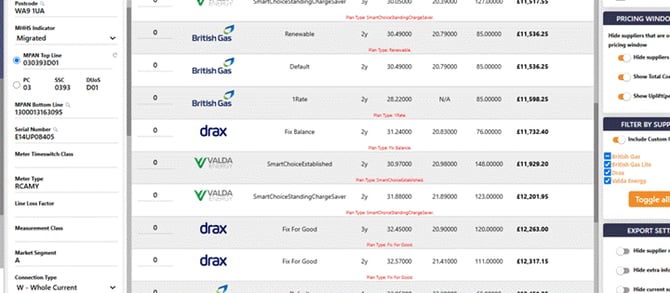
An Advanced meter is a meter that was half-hourly (Profile Class 00) before MHHS and has since migrated. Use this guide to check how a meter should quote before raising a ticket.
1. Check three fields|
Field |
What it tells you |
|
MHHS Indicator |
Whether the meter has migrated |
|
Market Segment |
A = Advanced, so it quotes as half-hourly |
|
Connection Type |
W – Whole Current = no kVA prompt and no Capacity Charge |
On older records these fields may be blank. They fill in automatically when you change the Supply Details screen or generate a quote.
2. What to expect|
Meter |
Quoted as |
kVA asked and Capacity Charge? |
|
Not migrated, Profile Class 00 |
Half-hourly, by Voltage Type |
Yes, unless Measurement Class G |
|
Migrated, Market Segment A (Advanced) |
Half-hourly, by Voltage Type |
Yes, unless Whole Current |
|
Not migrated Profile Class 01–08, or migrated with another Market Segment |
Small business, by Profile Class and SSC |
No |
Where kVA is asked, enter it before quoting (WebCRM needs a value above zero; Sales accepts zero). Capacity Charges are priced from Voltage Type data, which usually, but not always, matches the Connection Type.
3. Prompts you may see|
Prompt |
When |
What to do |
|
Rate Structure |
The SSC is blank, from a lookup or a manually edited top line |
Enter an SSC or Rate Structure before quoting. Rate Structure is currently only used by Scottish Power. |
|
MOP, DA and DC |
Yu contracts |
You can quote without them, but must add them in Supply Details before a PDF or DocuSign contract. MPIDs fill from a meter lookup where available. They aren't validated, so check they're correct. |
|
Supplier extras (e.g. Aggregator, Direct) |
Some suppliers, when you choose a PDF or DocuSign contract |
Complete the popup. Your answers aren't saved, so you'll enter them for each contract. |
|
You see |
Why |
Raise a ticket? |
|
A half-hourly quote on a meter showing Profile Class 03 or 04 |
Profile Class alone doesn't decide the route. Check Market Segment and Connection Type (section 1) |
No, if Market Segment is A |
|
Fewer suppliers than before |
Not all suppliers price migrated meters yet |
No |
|
No prices, or a supplier-agreed price you can't place |
Known issue for some Advanced meters showing Profile Class 03/04 |
Yes: include MPAN, supplier and agreed price |
|
kVA or Capacity Charge doesn't match the Connection Type |
Possible data mismatch |
Yes: include MPAN |
MPAN 1300013163095, top line 03 0393 D01: Migrated, Market Segment A, Whole Current. It used to return a single-rate SME quote as Profile Class 03. It now quotes half-hourly, with 1-rate and 2-rate products, no kVA prompt and no Capacity Charge.
If you would like to download this information, please click on the link below: